










Rodok
Rodok for Chrome

LinkedIn email finder Chrome extension, with signals and AI

Open a LinkedIn profile and Rodok shows their work email, their mobile and what just changed at their company, right next to the page.

Free to install, with a Rodok account. Email and mobile lookups are on Pro: $79 a month for 3 seats.

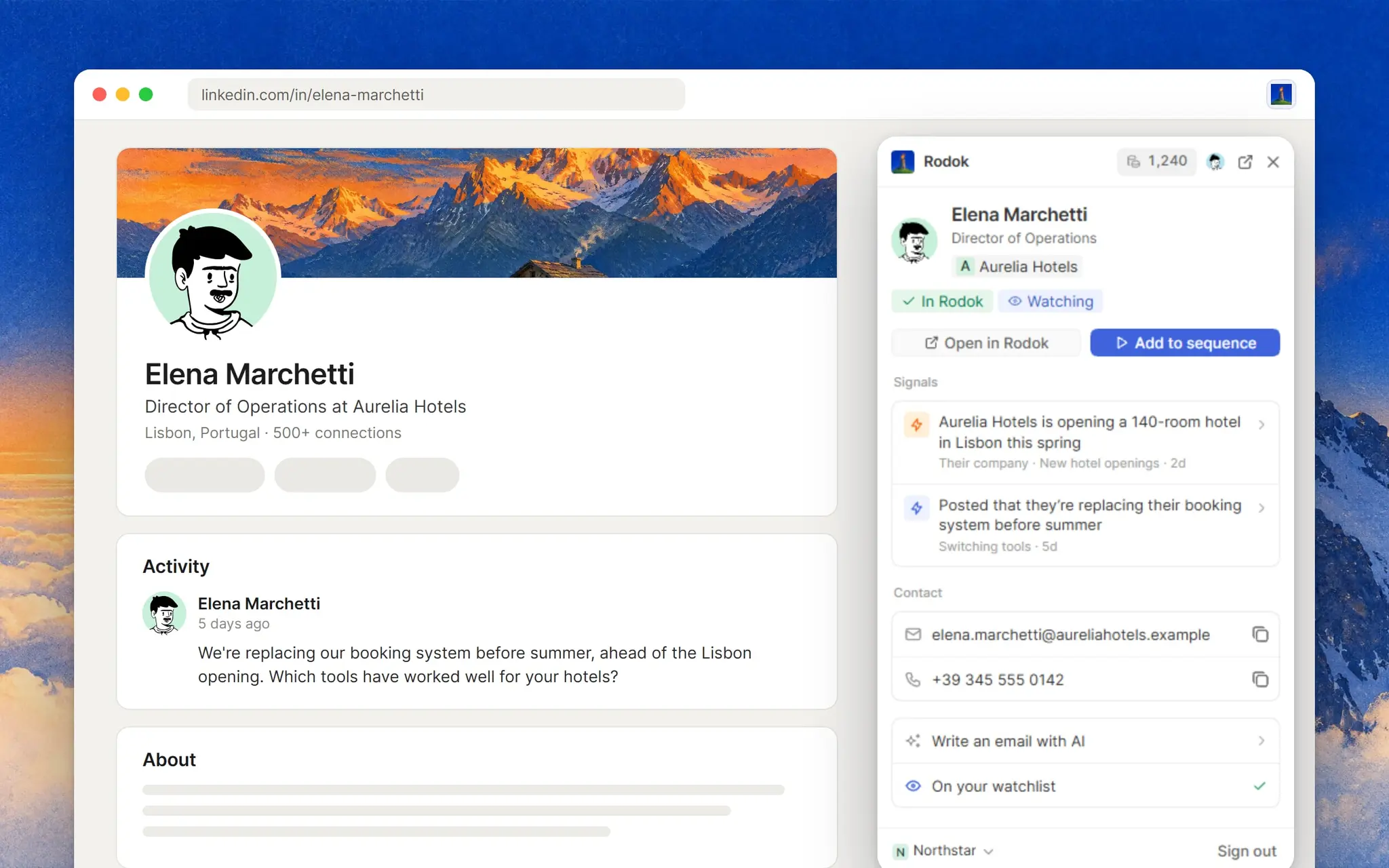
The Rodok extension open beside a LinkedIn profile: the person's signals, work email and mobile

The Rodok panel on a LinkedIn profile. Example data.

Open a LinkedIn profile and Rodok shows their work email, their mobile and what just changed at their company, right next to the page. Save the person, write to them with AI or add them to a sequence without leaving LinkedIn, and everything lands in your Rodok workspace.

Everything from the panel

Find the contact details, write the email, start the sequence and watch the account, on the LinkedIn page you are already reading.

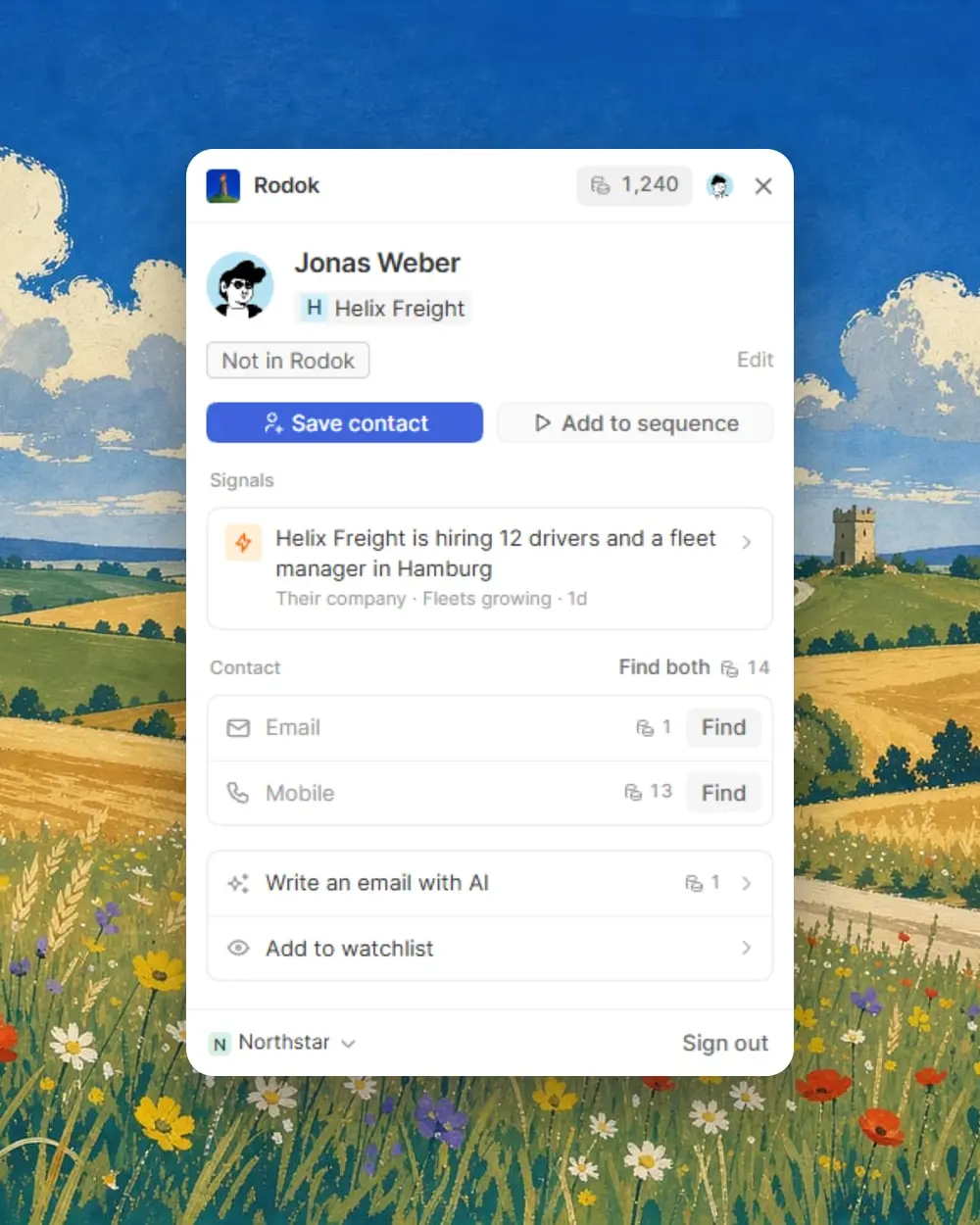
The Rodok panel on a LinkedIn profile finding a work email and mobile
Email and mobile in one click
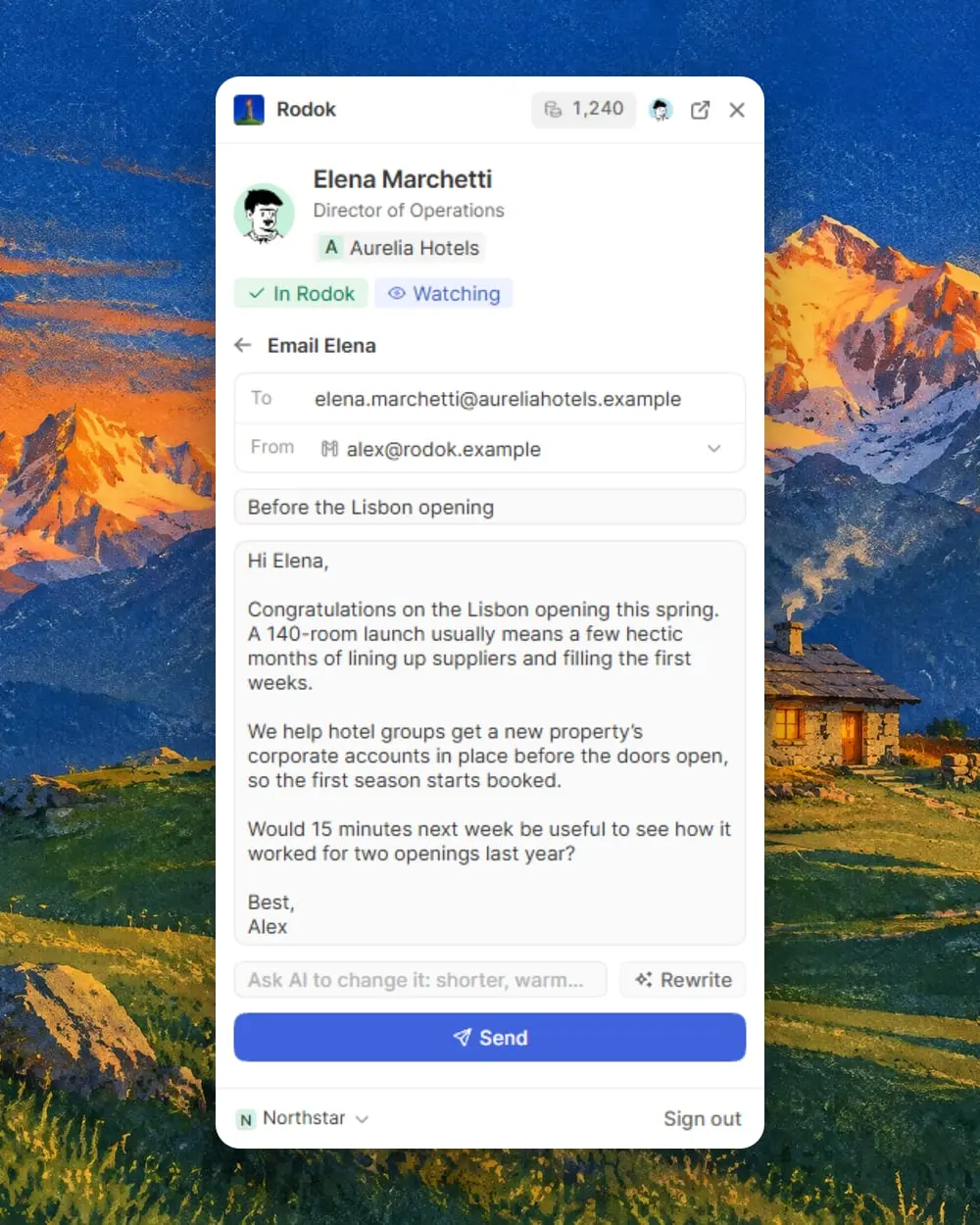
The Rodok panel writing an email with AI from a signal
Write with AI, send from your mailbox
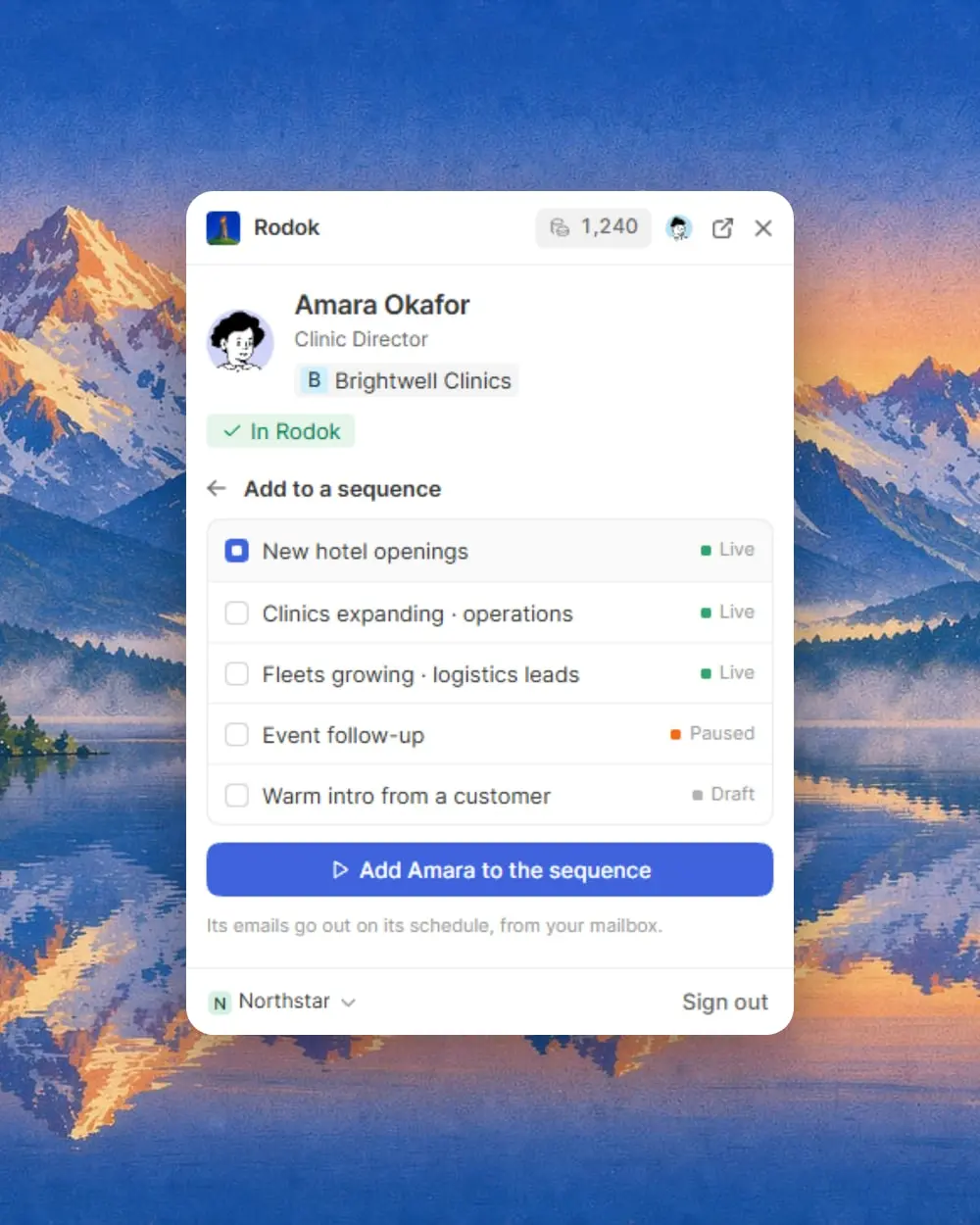
The Rodok panel adding a person to a sequence
Into a sequence in two clicks
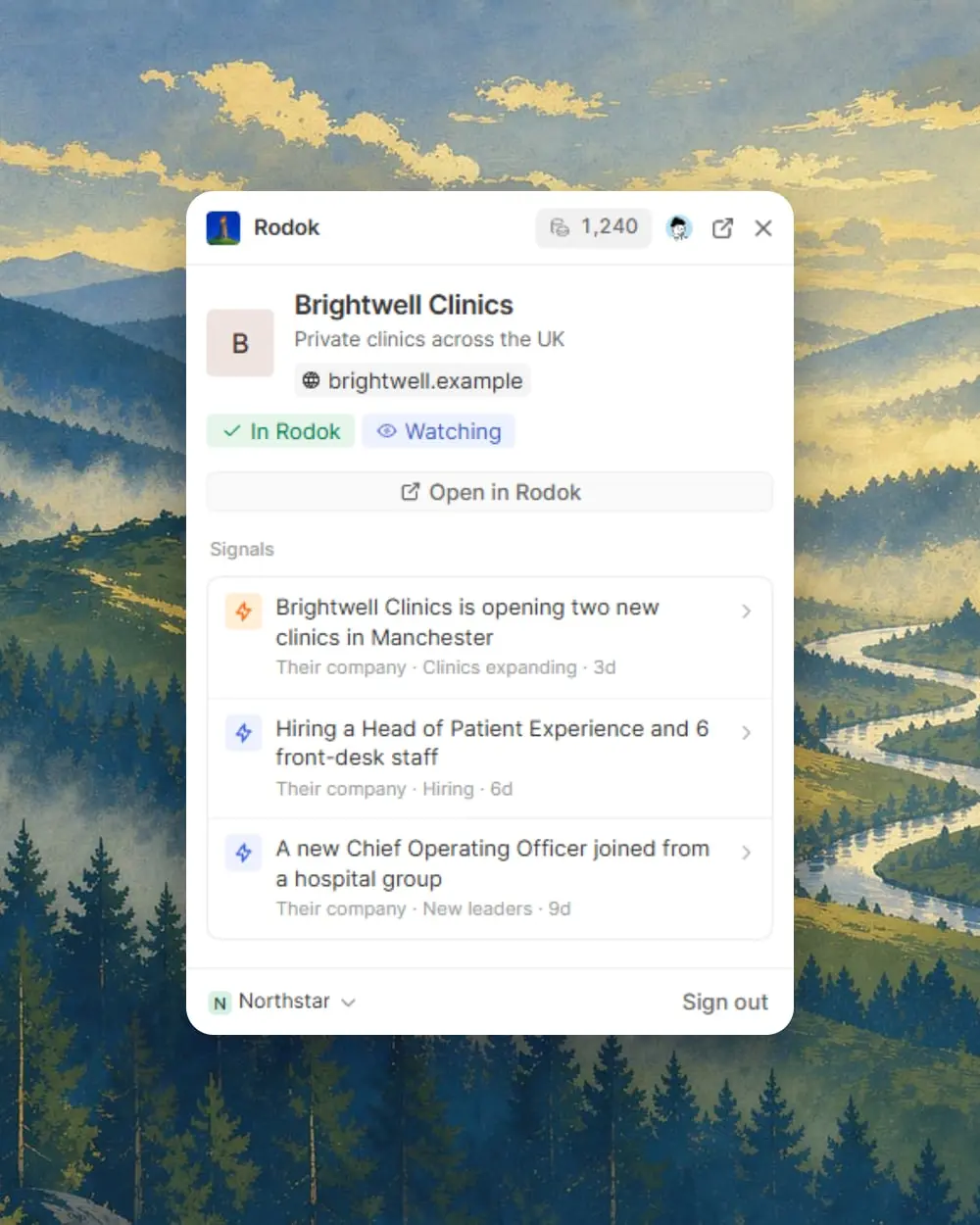
The Rodok panel on a LinkedIn company page with its signals
Watch the account
Available in the Chrome Web Store

Example data. Rodok is not affiliated with LinkedIn.

The whole CRM, not just the pipeline. Contacts, companies, tasks, email, automations, chat and the lead finder, in one app.

01Find

People from one sentence

Describe who you sell to. Rodok finds them by role, company size and city, with their work email, and sets apart the ones already in your CRM.

Every feature, and which plan has it

Pro includes everything in Starter.

  • Companies and peopleStarterEvery email, meeting, note and file on the record.
  • Deals and the pipeline boardStarterYour own stages, amounts, close dates and owners.
  • Tasks and remindersStarterA next step on every record and one list for the day.
  • Gmail and OutlookStarterEmail syncs onto the right contact, and you send from your own mailbox.
  • Calendar and booking linksStarterYour free times on a page; a booking files the contact and lands in both calendars.
  • Reports and forecastingStarterForecast against quota, pipeline by stage and win rates, per rep.
  • Team chatStarterChannels, direct messages and a thread on every deal, with @mentions.
  • ImportStarterBring contacts and companies in from Excel or CSV.
  • LinkedIn signalsProDescribe a signal in a sentence; trackers find the posts, job changes and hiring that match.
  • Lead finderProFind people by title, seniority, company size, industry and market, usually with a work email.
  • EnrichmentProFill in the company, website and LinkedIn page for the people you add.
  • SequencesProEmail steps from your own mailbox and LinkedIn steps as tasks for the rep.
  • Replies inboxProReplies sorted by intent, so the ones that matter come first.
  • AutomationsProSay what should happen; it runs from a signal, a deal moving, a schedule or a webhook.
  • AI assistantProAsk in plain words; it finds people, writes emails and fills the CRM, and asks before it sends or spends.
  • Teams and custom rolesProDecide who sees what, down to a field, and check it with View as.

And the rest. Integrations, booking, reports, chat, roles and an audit log, already connected.

Works with the tools you already use

Gmail, Outlook or any mailbox, Google Calendar, LinkedIn, Slack, webhooks, and imports from Excel or CSV. AI is built in, with nothing to set up.

Booking links

Your own page with your free times. A booking files the contact and lands in both calendars.

Reports and forecasting

Forecast against quota, pipeline by stage, win rates and the sequence-to-deal funnel, per rep.

Team chat on every record

Channels, direct messages and a thread on every deal, with @mentions of teammates and records.

AI that knows your business

Give it your website. It writes your profile, who you sell to and how, and every message starts from there.

Roles, teams and permissions

Decide who sees what, down to a single field. Scope deals to their owner or team, and check it with “View as”.

An audit log of everything

Every action by every person and automation, searchable and exportable.

Chrome extension: what's covered

A clear line between what is in the product and what is not, so you can decide in a minute.

Covered

  • Work email and mobile from the profile you have open
  • Buying signals for the person and their company
  • Write an email with AI and send it from your own mailbox
  • Add the person to a sequence or the watchlist
  • Company lookups from any company website
  • Shows whether someone is already in your CRM

Not what Rodok is for

  • Safari and Firefox
  • Chrome on phones and tablets, which has no extensions
  • Using it without a Rodok account

Pricing

Seats are included, and credits cover signals, lead lists and AI.

Starter$29a month

3 seats, $9 per extra seat. The CRM: pipeline, contacts, Gmail and Outlook, calendar, booking links and reports.

Start with Starter
Pro$79a month

3 seats, $19 per extra seat. Everything in Starter plus LinkedIn signals, the lead database, sequences and AI agents to find new clients.

Start with Pro

The Rodok Chrome extension is a LinkedIn email finder that sits next to the profile you are reading, with the rest of your sales workspace. Open a profile or a company page and a panel on the right shows whether the person is already in your CRM, their work email and mobile, the signals Rodok has picked up about them and their company, and what you can do next.

How to install it

  1. Open Rodok in the Chrome Web Store and click Add to Chrome.
  2. Pin the Rodok icon so it stays in your toolbar.
  3. Open any LinkedIn profile. The panel appears on the right; click Sign in and approve the connection in the Rodok window that opens.

That's it. If you belong to several workspaces, you can switch between them at the bottom of the panel.

What you can do from the panel

On a LinkedIn profileWhat happens
See if they're in RodokA badge shows "In Rodok" and opens the record in one click
Find email and mobileThe work email is checked before it is saved; the mobile is looked up when one exists
Read the signalsNew hires, new offices, funding and posts about a problem you solve, for the person and the company
Write with AISay what the email should say or start from a signal; edit it, pick the mailbox and send
Add to a sequencePick a sequence and they're in; follow-ups go out on its schedule and stop when they reply
Watch the accountRodok tells you when the person or the company posts, hires or changes jobs

On a company's own website, click the Rodok icon in the toolbar to see whether the company is in your workspace, save it or start watching it.

What it reads, and when

The extension reads the name, headline, current company and address of the LinkedIn page you have open, only while the panel is open, to match the person in your workspace. It works through your own Rodok account: what you save goes to your workspace and nowhere else. You can close the panel on any page, and it stays closed until you open it again.

What to look for in a LinkedIn email finder extension

What to checkWhy it mattersIn Rodok
Checks the emailA bounced email hurts every email you send after itAddresses that would bounce are not saved
Finds the mobile tooA call or a text often lands where an email doesn'tMobile looked up in the same click
Charges fairlySome extensions spend a credit on every searchNothing charged when nothing is found
Saves where you workCopying an address into a CRM by hand is where mistakes happenSaved on the contact in your Rodok CRM
Gives a reason to writeAn email with no reason gets no replyThe signals for the person and their company, next to the email
Reads only what you openAn extension can see a lot of your browsingOnly the LinkedIn page you have open, while the panel is open

What it costs

The extension is free to install. Email and mobile lookups are part of Rodok Pro, $79 a month for 3 seats with 2,500 credits a month. A found email uses about one credit and a mobile a few more, and nothing is charged when nothing is found. Every action shows its credit cost before you click. See pricing.

When it helps most

  • Reading a profile anyway. You found someone through a post or a search. The email, mobile and signals are already in the panel.
  • After a job change. A new leader is reviewing their tools in their first months. See new role outreach templates.
  • Before a call. Open their profile and see what changed at their company this week.

For whole lists rather than one profile at a time, use the lead finder or enrich up to 50 people at once from People. More on finding emails: LinkedIn email finder.

Frequently asked questions

Is there a free LinkedIn email finder Chrome extension?

Rodok's is free to install. You need a Rodok account, and email and mobile lookups use credits from Rodok Pro; nothing is charged when nothing is found.

Does it work in Edge, Brave or Arc?

They install extensions from the Chrome Web Store, so it should, but Rodok is built and tested in Google Chrome.

Will the person know I looked at them in Rodok?

No. Rodok reads the page you already have open; looking up an email sends them nothing.

Do I have to use the extension?

No. Everything it does also works in the Rodok web app and from Claude or ChatGPT. The extension saves you the switch when you are already on LinkedIn.

How do I sign out or switch workspace?

At the bottom of the panel, pick another workspace from the menu, or click Sign out.

More of Rodok